Description
Internet Explorer browsers may require NFA Online to be added as an IE Trusted Site. The following provides guidance for setting this browser requirement:
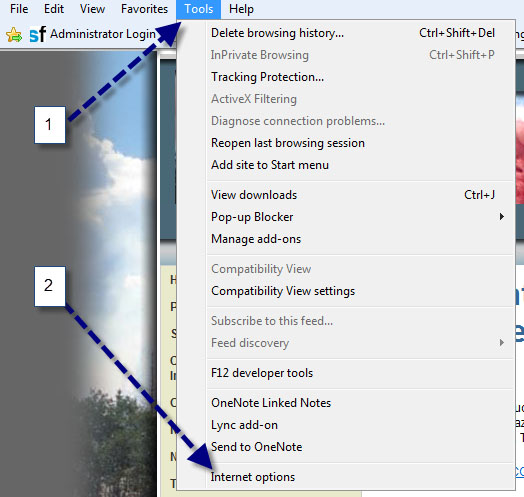
Step 1: Open an IE browser; select "Tools" and then select "Internet Options". (Note: If you do not see the "Menu Bar" press the "Alt" key for it to display.)
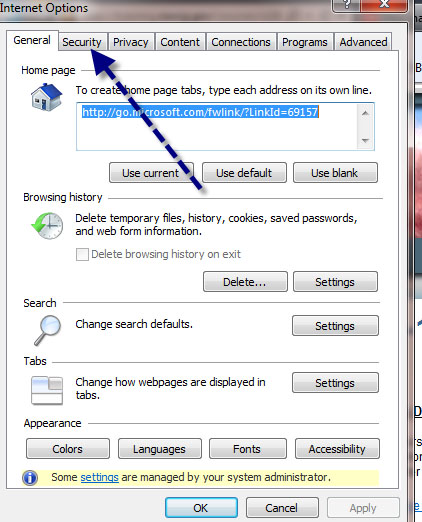
Step 2: Select the "Security" Tab.
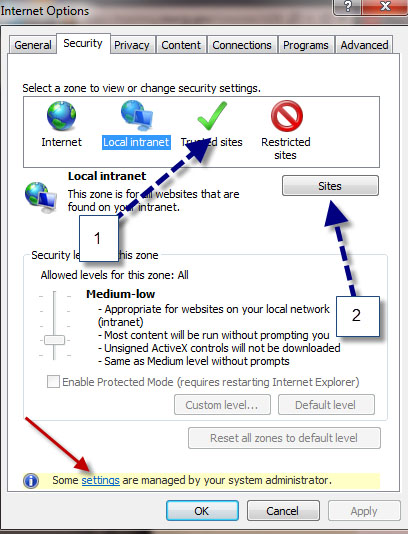
Step 3: Select "Trusted Sites" and then select the "Sites" button. (Note: If settings are managed by your system administrator you will need to contact your IT department for assistance.)
Step 4: Place your cursor in the "Add this website to the zone:" and type "https://*.plateau.com" and select the "Add" button. Confirm the website has been added to the "Websites" list and select the "Close" button.

Note: If the "Add this website to the zone:" is grayed out, this means the setting is not available to the user. You must contact your IT Department and request an IT admin update this setting.
|
|